
# 快速开始
# 准备工作
JDK >= 17 (推荐17版本)
Mysql >= 5.7.0 (推荐5.7版本)
Maven >= 3.0
1
2
3
2
3
# maven
- 在servers节点下面加入如下配置
 <server>
            <id>rdc-releases</id>
            <username>607d544e9a5742c775e9446b</username>
            <password>Q-tYFz_77hBk</password>
        </server>
        <server>
            <id>rdc-snapshots</id>
            <username>607d544e9a5742c775e9446b</username>
            <password>Q-tYFz_77hBk</password>
        </server>
1
2
3
4
5
6
7
8
9
10
2
3
4
5
6
7
8
9
10
- 在mirrors节点下面加如下配置
 <mirror>
            <id>mirror</id>
            <mirrorOf>central,jcenter,!rdc-releases,!rdc-snapshots</mirrorOf>
            <name>mirror</name>
            <url>https://maven.aliyun.com/nexus/content/groups/public</url>
        </mirror>
1
2
3
4
5
6
7
2
3
4
5
6
7
# 运行系统
# 1、克隆后端git项目
git clone https://github.com/fast4cloud/fast-cloud.git
1
2
2
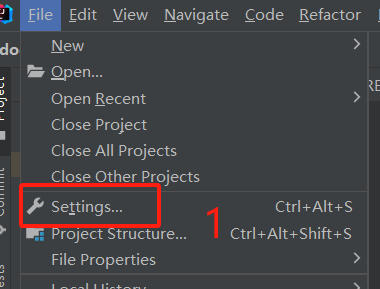
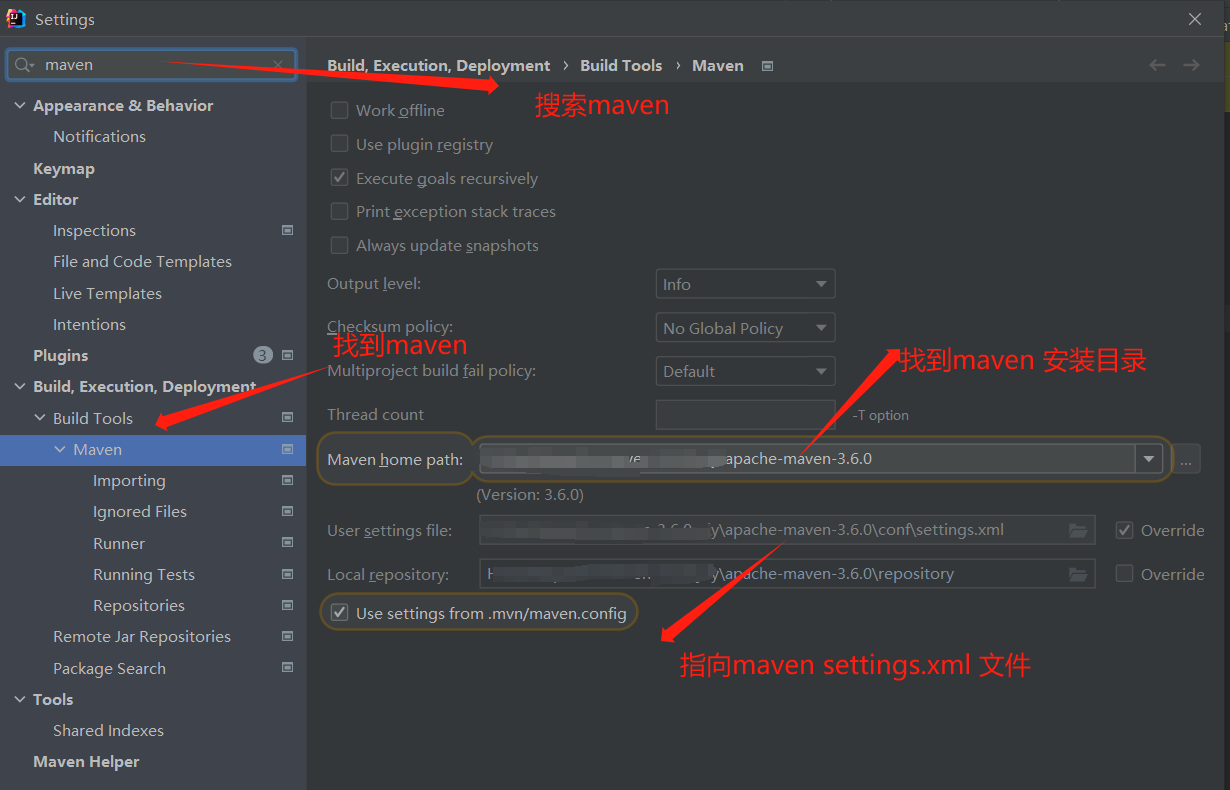
# 2、IDEA导入克隆好的文件
 - 配置ide maven配置
 |  |
# 3、导入sql文件
- 找到项目上db文件上的sql文件并执行

 <img src="../mdimg/deploy/img.png">
# 4、nacos 文件下载
https://github.com/alibaba/nacos/releases (opens new window)
找到nacos config下目录的这个文件
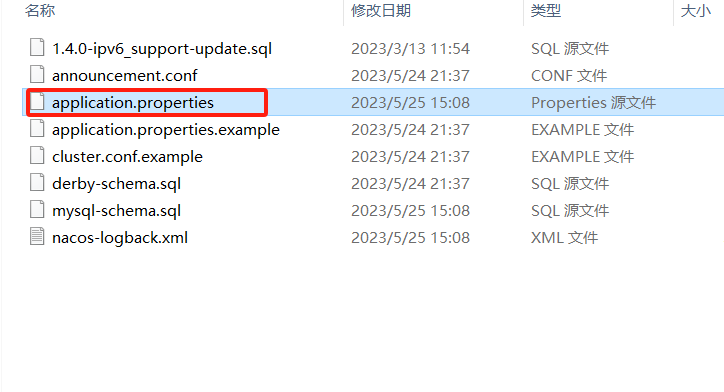
填写mysql服务地址和密码
 - 启动nacos(找到nacos bin目录启动脚本)
访问nacos
账户密码为:nacos/nacos
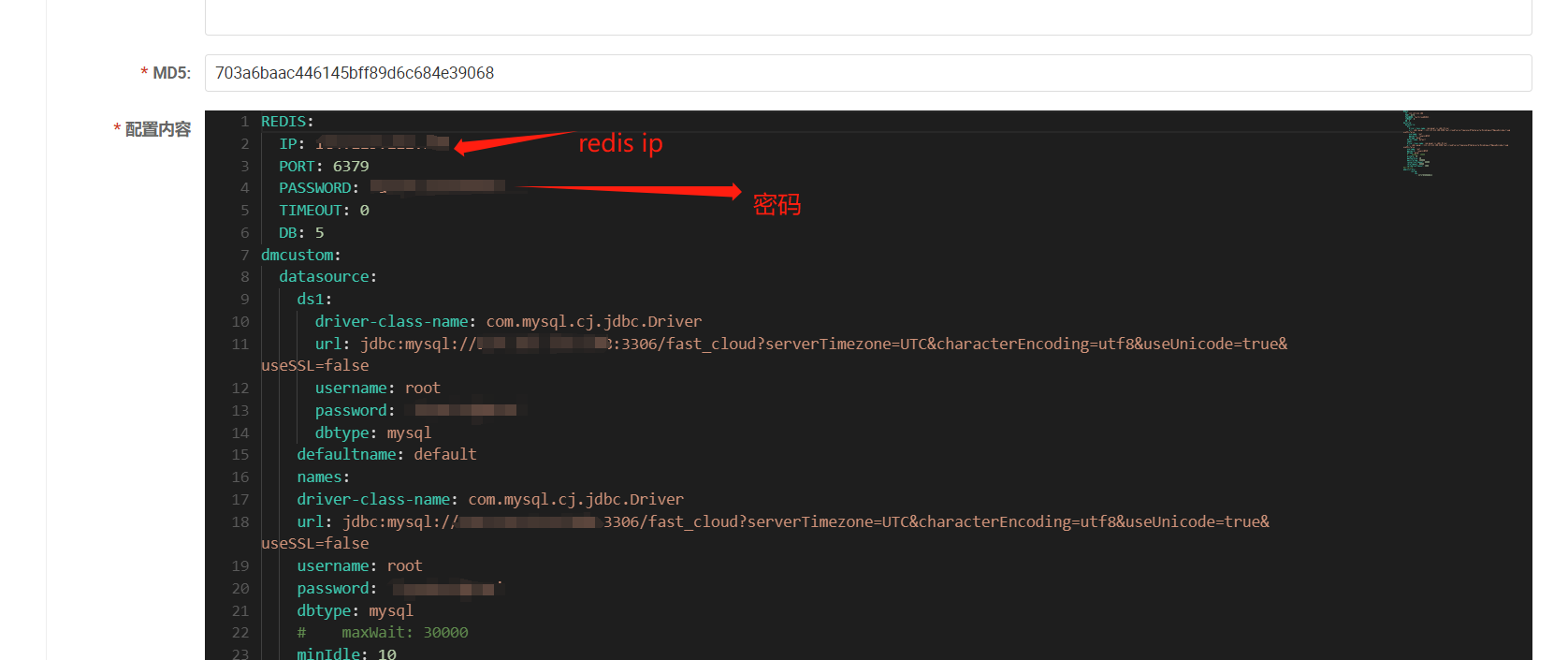
nacos 配置信息配置,这块是通用基础配置,包含数据库和redis这些。
 |  |
# 5、启动服务
- fast-admin (※)
- fast-user (※)
- fast-gateway (※)
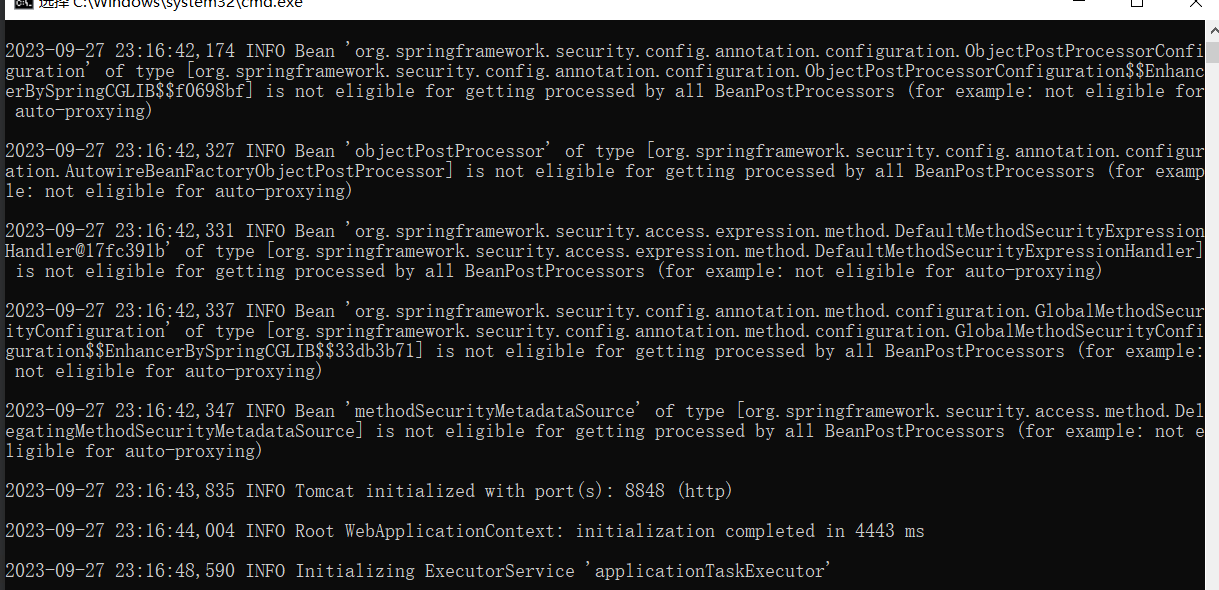
- fast-generator (生成前后端代码时需要启动) 启动上述三个※服务
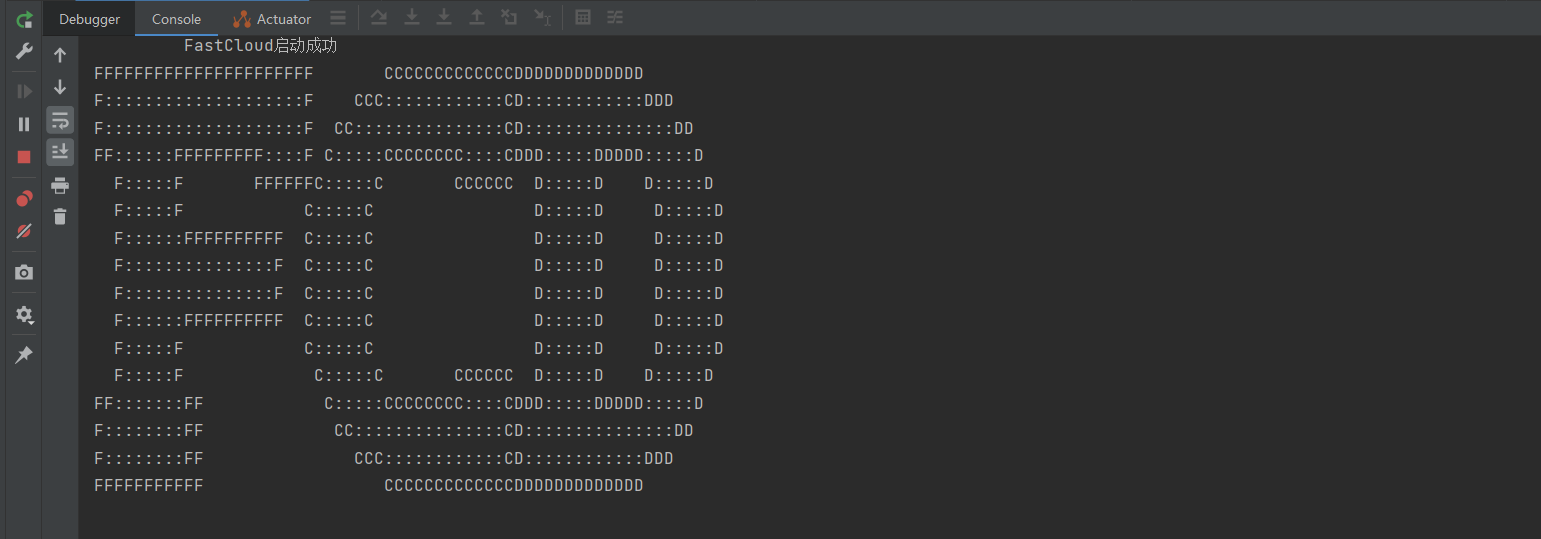
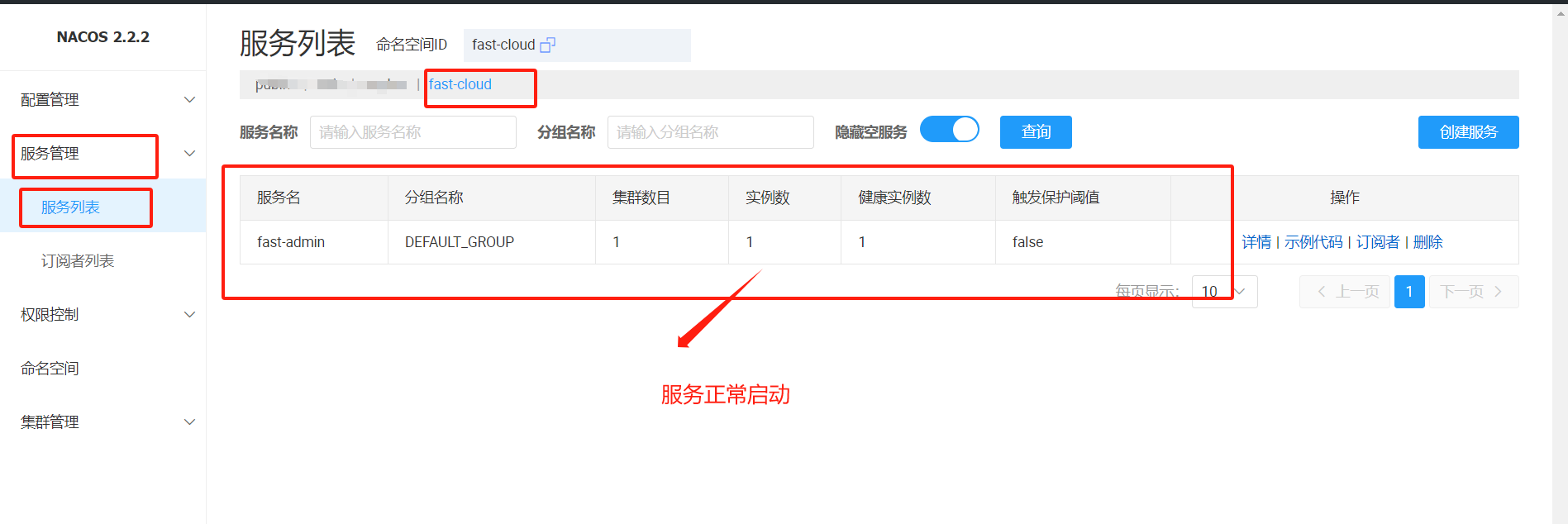
- 出现如下banner图时代表启动成功,同时可以去nacos观察服务是否注册成功
# 6、克隆前端git项目
git clone https://github.com/fast4cloud/fast-cloud-ui.git
1
2
2
# 7、IDEA导入克隆好的文件
# 8、node.js下载
最低版本为16.0.0
# 9、 npm install 项目
# 10、启动npm run dev 访问项目
http://localhost:8888/ (opens new window)

# maven 配置完整配置
<?xml version="1.0" encoding="UTF-8"?>
<settings xmlns="http://maven.apache.org/SETTINGS/1.0.0"
          xmlns:xsi="http://www.w3.org/2001/XMLSchema-instance"
          xsi:schemaLocation="http://maven.apache.org/SETTINGS/1.0.0 http://maven.apache.org/xsd/settings-1.0.0.xsd">
		    <localRepository>本地仓库目录地址\repository</localRepository>

    <mirrors>
        <mirror>
            <id>mirror</id>
            <mirrorOf>central,jcenter,!rdc-releases,!rdc-snapshots</mirrorOf>
            <name>mirror</name>
            <url>https://maven.aliyun.com/nexus/content/groups/public</url>
        </mirror>

    </mirrors>
    <servers>
        <server>
            <id>rdc-releases</id>
            <username>607d544e9a5742c775e9446b</username>
            <password>Q-tYFz_77hBk</password>
        </server>
        <server>
            <id>rdc-snapshots</id>
            <username>607d544e9a5742c775e9446b</username>
            <password>Q-tYFz_77hBk</password>
        </server>
    </servers>
    <profiles>
        <profile>
            <id>rdc</id>
            <properties>
                <altReleaseDeploymentRepository>
                    rdc-releases::default::https://packages.aliyun.com/maven/repository/2264613-release-DJuYYq/
                </altReleaseDeploymentRepository>
                <altSnapshotDeploymentRepository>
                    rdc-snapshots::default::https://packages.aliyun.com/maven/repository/2264613-snapshot-v0RKS0/
                </altSnapshotDeploymentRepository>
            </properties>
            <repositories>
                <repository>
                    <id>central</id>
                    <url>https://maven.aliyun.com/nexus/content/groups/public</url>
                    <releases>
                        <enabled>true</enabled>
						<updatePolicy>always</updatePolicy>
                    </releases>
                    <snapshots>
                        <enabled>false</enabled>
                    </snapshots>
                </repository>
                <repository>
                    <id>snapshots</id>
                    <url>https://maven.aliyun.com/nexus/content/groups/public</url>
                    <releases>
                        <enabled>false</enabled>
						<updatePolicy>always</updatePolicy>
                    </releases>
                    <snapshots>
                        <enabled>true</enabled>
                    </snapshots>
                </repository>
                <repository>
                    <id>rdc-releases</id>
                    <url>https://packages.aliyun.com/maven/repository/2264613-release-DJuYYq/</url>
                    <releases>
                        <enabled>true</enabled>
						<updatePolicy>always</updatePolicy>
                    </releases>
                    <snapshots>
                        <enabled>false</enabled>
                    </snapshots>
                </repository>
                <repository>
                    <id>rdc-snapshots</id>
                    <url>https://packages.aliyun.com/maven/repository/2264613-snapshot-v0RKS0/</url>
                    <releases>
                        <enabled>false</enabled>
						<updatePolicy>always</updatePolicy>
                    </releases>
                    <snapshots>
                        <enabled>true</enabled>
                    </snapshots>
                </repository>
            </repositories>
            <pluginRepositories>
                <pluginRepository>
                    <id>central</id>
                    <url>https://maven.aliyun.com/nexus/content/groups/public</url>
                    <releases>
                        <enabled>true</enabled>
                    </releases>
                    <snapshots>
                        <enabled>false</enabled>
                    </snapshots>
                </pluginRepository>
                <pluginRepository>
                    <id>snapshots</id>
                    <url>https://maven.aliyun.com/nexus/content/groups/public</url>
                    <releases>
                        <enabled>false</enabled>
                    </releases>
                    <snapshots>
                        <enabled>true</enabled>
                    </snapshots>
                </pluginRepository>
                <pluginRepository>
                    <id>rdc-releases</id>
                    <url>https://packages.aliyun.com/maven/repository/2264613-release-DJuYYq/</url>
                    <releases>
                        <enabled>true</enabled>
                    </releases>
                    <snapshots>
                        <enabled>false</enabled>
                    </snapshots>
                </pluginRepository>
                <pluginRepository>
                    <id>rdc-snapshots</id>
                    <url>https://packages.aliyun.com/maven/repository/2264613-snapshot-v0RKS0/</url>
                    <releases>
                        <enabled>false</enabled>
                    </releases>
                    <snapshots>
                        <enabled>true</enabled>
                    </snapshots>
                </pluginRepository>
            </pluginRepositories>
        </profile>
    </profiles>
    <activeProfiles>
        <activeProfile>rdc</activeProfile>
    </activeProfiles>
</settings>
1
2
3
4
5
6
7
8
9
10
11
12
13
14
15
16
17
18
19
20
21
22
23
24
25
26
27
28
29
30
31
32
33
34
35
36
37
38
39
40
41
42
43
44
45
46
47
48
49
50
51
52
53
54
55
56
57
58
59
60
61
62
63
64
65
66
67
68
69
70
71
72
73
74
75
76
77
78
79
80
81
82
83
84
85
86
87
88
89
90
91
92
93
94
95
96
97
98
99
100
101
102
103
104
105
106
107
108
109
110
111
112
113
114
115
116
117
118
119
120
121
122
123
124
125
126
127
128
129
130
131
132
133
134
2
3
4
5
6
7
8
9
10
11
12
13
14
15
16
17
18
19
20
21
22
23
24
25
26
27
28
29
30
31
32
33
34
35
36
37
38
39
40
41
42
43
44
45
46
47
48
49
50
51
52
53
54
55
56
57
58
59
60
61
62
63
64
65
66
67
68
69
70
71
72
73
74
75
76
77
78
79
80
81
82
83
84
85
86
87
88
89
90
91
92
93
94
95
96
97
98
99
100
101
102
103
104
105
106
107
108
109
110
111
112
113
114
115
116
117
118
119
120
121
122
123
124
125
126
127
128
129
130
131
132
133
134